PERSONAL WEBSITES & INVITATIONS
Ask them out. Make it feel like you.
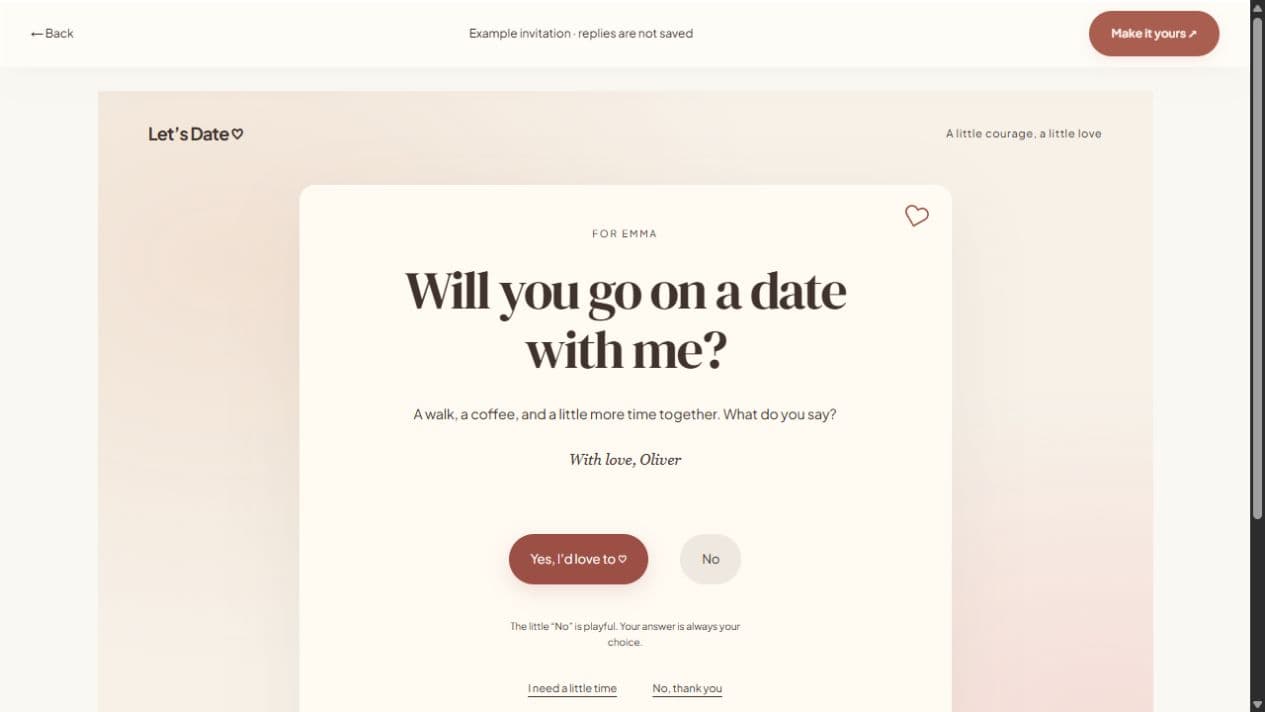
A date invitation link gives a small question a little room. Write what you want to ask, add a photograph if you like, and send one personal page. They can open it on their phone, answer yes, no, or maybe, and suggest dates or a favorite place without creating an account.
Start with a local draft. Verify your email to publish. Guests do not need an account.
MAKE IT PERSONAL
Date Invitation Maker
A clear invitation, with room for their answer
Choose a question that matches your relationship. For a first date, a short note and one simple idea often say enough. For someone you already know, mention the café, conversation, or shared interest that made you think of them. Leave the decision open: a good invitation makes it easy to understand the ask and comfortable to decline.
Find a day together
You do not need to confirm a venue before you send a question. Enable availability so they can suggest days and a location in their reply. If you already have a confirmed event, add its date, time, timezone, and place. A suggested date is an invitation to discuss plans, not a booking.
Send it personally
Preview the page on your phone before sharing. Use WhatsApp, email, native sharing, or the copy-link button, and send it directly to the person you mean to invite. A password can add an access step if the note is sensitive. Shared links can be forwarded, so keep personal details limited to what you are comfortable sharing.
FROM IDEA TO THEIR SCREEN
Make it in a few thoughtful steps.
Choose a starting style
Open the invitation studio and edit the question to fit your occasion.
Add what matters
Write your note and optionally add a photograph. Enable availability suggestions when plans are flexible.
Preview and publish
Check the recipient view. Sign in, verify your email, and publish. Optional passwords add an access step.
Share your link
Copy the short link or use WhatsApp, email, native sharing, or QR. Edit the draft and publish again to update the same live page.
A little clarity before you start.
Can they reply without signing up?
Yes. Recipients can answer and suggest availability without an account. Password-protected invitations require the password you chose.
Can I send an invitation without building a full website?
Yes. The quick invitation studio focuses on a question, optional photo, and note. The full website studio adds galleries, timelines, and more sections.
Can I change the invitation after sharing?
Edit the draft and publish again. Publishing updates the live page while keeping its link; autosave alone leaves the shared version unchanged.